Session 1: Catch the Stars
In this session you build a mini game: a star falls down and you catch it with a basket. By the end of the session everything moves, the game keeps track of how many stars you catch, and you have your first game of your own.
What you’ll learn today
- Using variables to position objects
- The
draw()function: what you draw every frame - The
update()function: what changes every frame - Keyboard input: moving with the arrow keys
Step 0: Setup
- Open Thonny.
- Download the starter via this link, unpack the ZIP and open
main.pyin Thonny. - Click the green Run button. You see a dark blue window with a basket at the bottom and a star at the top, but nothing moves yet.
- Problems? Take a look at Installing Thonny.
Step 1: Let the star fall
The update() function runs 60 times per second. So everything you put in it runs 60 times per second. That is how movement works in a game.
Right now there is only pass in update(). That means “do nothing”. Remove pass and add this:
def update():
    star.y = star.y + 3
Click Run. The star now falls from top to bottom. When it falls off the screen, it disappears. We’ll fix that in a moment.
What happens here? star.y is the vertical position of the star. The bigger y, the lower on the screen. By adding + 3 every frame, the star drops a little each time.
The coordinate system: (0, 0) is at the top left, not at the bottom left like in maths. x goes to the right, y goes down. The star starts at y = 30 (almost at the top), the basket sits at y = 370 (almost at the bottom).
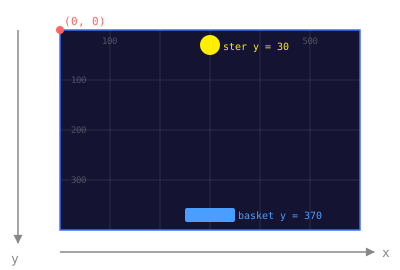
Move your mouse over the screen below to see the coordinates:
Move your mouse over the screen to see the coordinates.
Want to know more about how the screen works? → Coordinates explained
Adjust the sliders and watch how actor.x and actor.y change as the actor moves:
Step 2: ✅ Basic: move the basket
Time to steer the basket. Pygame Zero has a handy keyboard variable that keeps track of which keys are pressed.
Add this to update(), after the line about the star:
def update():
    star.y = star.y + 3

    if keyboard.left:
        basket.x = basket.x - 5
    if keyboard.right:
        basket.x = basket.x + 5
Click Run and use the arrow keys. The basket moves along now!
Tip (optional, counts as Stretch): If you move the basket too far left or right, it disappears off the screen. Can you add a check that stops that? Hint: use WIDTH and compare it with basket.x.
Step 3: ⭐ Stretch: catch the star
Now you want something to happen when the basket touches the star. For that you use colliderect. It checks whether two rectangles overlap.
Add this to update():
    if star.colliderect(basket):
        star.y = 0
The star jumps back to the top when you catch it. But what if you miss it? Add this too:
    if star.y > HEIGHT:
        star.y = 0
Bonus: Make the star come back at a random spot every time. Add this at the top of the file:
import randomThen replace star.y = 0 (in both places) with:
        star.x = random.randint(20, WIDTH - 20)
        star.y = 0
Now the star falls at a different spot every time. Much harder to catch!
Step 4: 🔥 Expert: add a score
A real game keeps track of what you score. For that you need a variable that lives outside the functions: a global variable.
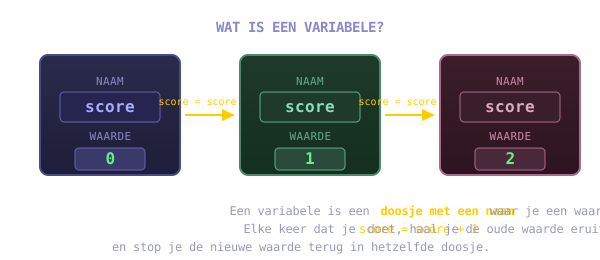
Click the button below to see how score changes every time you catch a star:
Add this at the top, outside all functions (after the lines about basket and star):
score = 0In draw(), add:
screen.draw.text(f"Score: {score}", topleft=(10, 10), color="white")In update(), change the catch code so the score goes up:
    if star.colliderect(basket):
        global score
        score = score + 1
        star.x = random.randint(20, WIDTH - 20)
        star.y = 0
global score tells Python: “I mean the score from outside this function, not a new local variable.” Without that line you get an error message.
Click Run. The score sits at the top left and goes up every time you catch a star!
Showcase
Show your game to a coach and a buddy. Tell them what you made: what works, and what extras you added.
See you next time!
“Next time: things that FIGHT BACK. And they go BOOM, with real sound.”
Take it home
Try one of these extensions at home. Each one comes with a code hint to get you going.
Limit lives — Add
levens = 3. On a miss (star.y > HEIGHT):levens -= 1. Stop the game whenlevens == 0withgame_over = Trueand show “Game Over” indraw().Random star colour — On every catch: give the star a new colour with
random.randint(50, 255)for red, green and blue. Start at 50, not at 0 — otherwise the star is sometimes black and invisible.Background — Draw fixed stars in the background in
draw()before the score. Usescreen.draw.filled_circle(x, y, 2, "white")at 20 random positions. Seedrandom.seed(42)so they don’t flicker.Second star — Make
sterren = [star, Actor("star")]. Give every star its ownx. Update both of them inupdate()and draw them indraw().High score — Keep track of
high_score. Ifscore > high_score:high_score = score. Showf"Best: {high_score}"next to the score.Smaller basket — After every 5 points:
basket.width = max(30, basket.width - 5). Resetbasket.widthon a restart.Bomb — Add a red circle that falls now and then. Use a timer
bom_timerandrandom.randintto decide when it shows up. If the basket hits the bomb:score -= 2.Difficulty — After every 5 stars: raise the falling speed by 1. Build in a maximum:
max(3, star_snelheid).