Coordinates in Pygame Zero
Pixels
A screen is a grid of tiny coloured dots: pixels. Our game window is 600 pixels wide and 400 pixels high: 240,000 pixels in total.
Every pixel has an address: (x, y). That way Pygame Zero knows exactly where to draw something.
Where is (0, 0)?
In maths graphs the zero point (0, 0) is at the bottom left. In Pygame Zero (0, 0) is at the top left.
xgoes to the right: the biggerx, the further to the right.ygoes down: the biggery, the lower on the screen.
Star and basket
In Catch the Stars the star starts at (300, 30): horizontally in the middle (x = 300 = half of 600), right at the top (y = 30). The basket sits at (300, 370): also in the middle, almost all the way at the bottom.
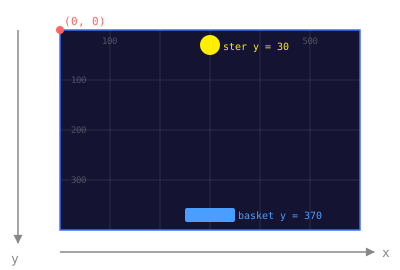
When you write:
star.y = star.y + 3you move the star 3 pixels down per frame, because a bigger y value means lower on the screen.
Position of an Actor
actor.pos is the centre of the picture, not the corner. You can also ask for the edges:
| Property | Meaning |
|---|---|
actor.left | left edge of the picture |
actor.right | right edge of the picture |
actor.top | top edge of the picture |
actor.bottom | bottom edge of the picture |
This is how you check whether the basket runs off the screen:
if basket.right > WIDTH:
    basket.x = WIDTH - basket.width / 2
Corners of the screen
| Corner | x | y |
|---|---|---|
| Top left | 0 | 0 |
| Top right | 600 | 0 |
| Bottom left | 0 | 400 |
| Bottom right | 600 | 400 |
| Middle | 300 | 200 |
Further reading: “Pixel Coordinates and Pygame Objects” by albro